
Email addresses and aliases
- Lettura
- 4 minuti
- Categoria
- Addresses and identities
With Proton Mail, there are several types of email addresses you can use.
Every Proton Mail account includes a free primary email address. With a paid Proton Mail plan, you can have multiple email addresses under one account. In this article, we explain how to set up additional addresses, hide-my-email aliases that keep your real address private, and custom domain addresses.
In this article
- Primary address
- Additional addresses
- Hide-my-email aliases
- Plus aliases
- Custom domain addresses
- Should I use an additional address, hide-my-email alias, or plus alias?
- Proton Mail domains (endings) explained
Primary address
Your primary address is the email address you signed up with.
You can’t disable your primary email address. But if you have more than one Proton Mail account, you can merge accounts to send and receive mail from all your addresses within the same mailbox.
Most primary addresses end in @proton.me or @protonmail.com(nuova finestra).
Learn more about Proton domain options
Additional addresses
If you’re on a paid Proton Mail plan, you can create additional email addresses under the same account.
This means you can have completely separate identities while managing your communications in the same place. For example:
- Primary address: [email protected]
- Additional address 1: [email protected]
- Additional address 2: [email protected]
By default, messages sent to your additional addresses will arrive in your main inbox. You can use filters, folders, and labels to organize incoming mail by address.
You can create at least 10 additional addresses, using any Proton domain or a custom domain you own. Your primary address doesn’t count toward this limit. Disabled custom domain addresses don’t count either.
Please note
- If you’re a member of a Proton group plan (Proton Family or Duo plans), only your plan administrator can create additional addresses for you.
- If you signed up to Proton Free before June 2022, you might have a free @proton.me address in addition to your primary address.
Create an additional address
- Sign in to account.proton.me/mail and go to Settings → All settings.

2. Select Identity and addresses from the sidebar.

3. Scroll to My addresses and select Add Proton address.

4. Enter a new address and display name in the pop-up window, then select Save address.

5. You may be asked to authenticate. Enter your password to confirm. If you have two-factor authentication (2FA) enabled, you may also need to enter a 2FA code.
Your additional address is now created.
Send an email from an additional address
- Open the email composer.

2. Go to the From field and click (or tap) your email address.
3. Select your preferred address from the menu.

When you send a message from an additional address, that’s the only address your recipient will see. They cannot see your primary address or any other addresses associated with your account.
Manage additional addresses
- Sign in to account.proton.me/mail and go to Settings → All settings.
- Select Identity and addresses from the sidebar.
- Scroll to My addresses. Find the address you want to manage and open the Actions menu.

From here you can:
- Enable an address
- Disable an address so it can’t be used to send or receive emails
- Set an address as default
- Permanently delete an address
- Change capitalization or punctuation for your username
Please note
- Disabled Proton addresses still count toward your address limit, but disabled custom domain addresses don’t.
- You can delete a Proton domain address once per year. Default, primary, and external addresses can’t be deleted.
- If an address is missing encryption keys, you’ll see Add keys in the Actions dropdown.
Change your default sending address
Your default address appears automatically in the From field for new messages.
Web
- Sign in at account.proton.me and go to Settings → All settings.
2. Select Identity and addresses from the sidebar.
3. Scroll to My addresses and find the address you want to make your default.
4. Open the Actions menu and select Set as default.
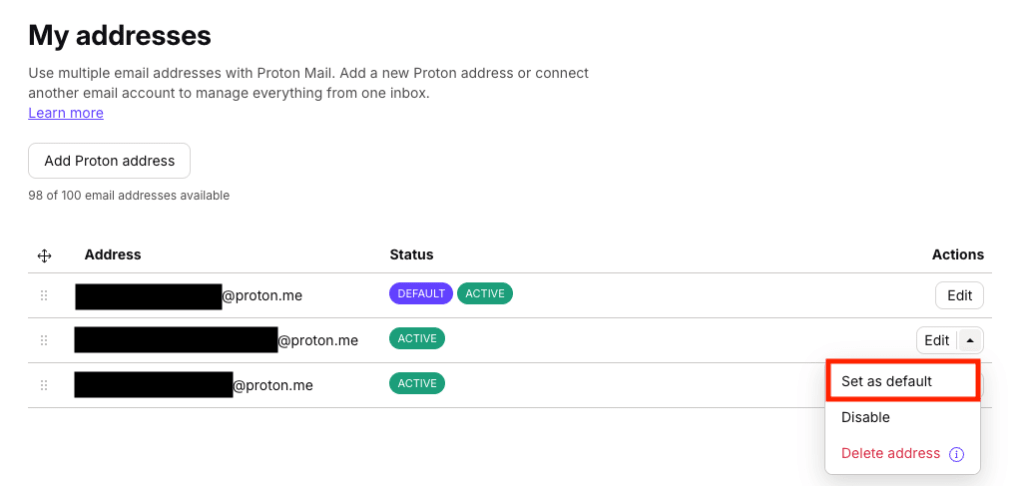
Your default address has now changed.
Mobile apps (Android, iOS)
- Tap the Menu icon (=) at the top left of the screen.

2. Select Settings.

3. Tap your account name.
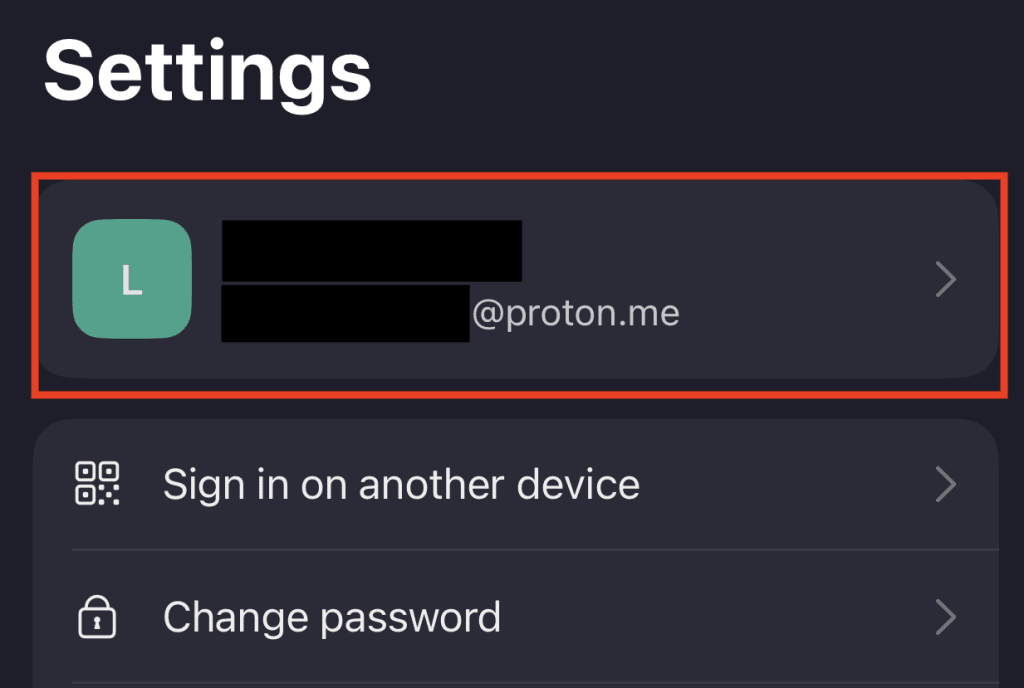
4. Tap the dropdown menu under Default email address and select your preferred default address.
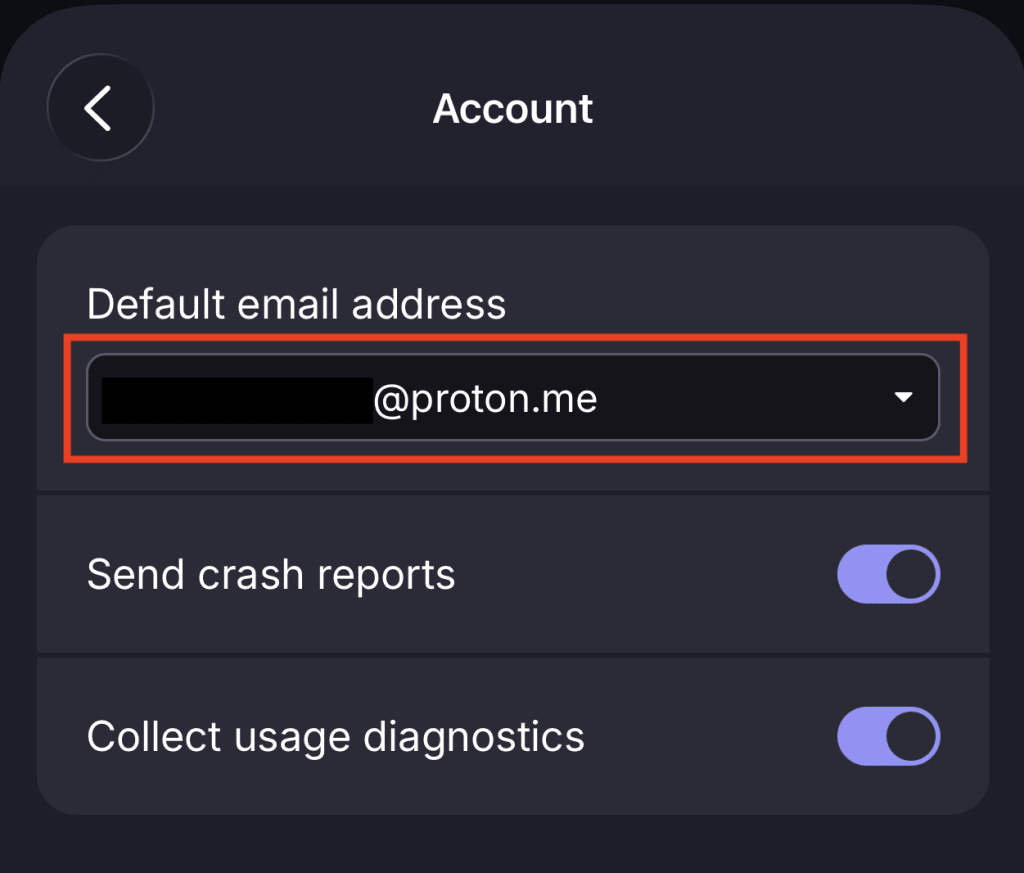
Your default address has now changed.
Hide-my-email aliases
A hide-my-email alias is a randomly generated throwaway email address that forwards messages to your mailbox. The sender never sees your real address, keeping it private. You can disable or delete an alias at any time.
If you’re on Proton Free or Proton Mail Plus, you can create up to 10 aliases. If you’re on a higher-tier plan like Proton Unlimited, you can create unlimited aliases.
Learn how to create and use hide-my-email aliases
Plus aliases
Plus aliases (or email subaddresses) let you create unlimited variations of any of your email addresses by adding the plus symbol (+) and a word after your username. For example, [email protected].
All mail sent to a plus alias arrives in your regular inbox. You don’t need to set anything up.
Custom domain addresses
If you own a domain, you can use it with any paid Proton Mail plan to create addresses. For example, if you own the domain “ericnorbert.com,” you can create an address like “[email protected]”.
Learn how to set up a custom domain in Proton Mail
Should I use an additional address, hide-my-email alias, or plus alias?
Use an additional address when you need another permanent email address. You choose the exact address you want, it uses a recognizable Proton domain, and you can set it as your default sender.
Use a hide-my-email alias when you want to sign up for a service without exposing your real address. You can disable the alias if you start getting spam. Your real address stays completely hidden from the services you sign up for.
Use plus aliases when you want a quick way to organize your mailbox with filters. Keep in mind that your real address is easy to guess from a plus address.
Proton Mail domains (endings) explained
A Proton Mail address can have one of four email domains, but not all of them are currently available for new accounts.
- @proton.me: This is the default domain for new accounts.
- @protonmail.com: You can select this domain instead of @proton.me when you sign up. It is also available for additional addresses on paid plans.
- @pm.me: Available on paid plans.
- @protonmail.ch: This is Proton’s original domain. If you joined before 2016, this will be your default address. If you’re on a paid plan, you can still create an additional address with this domain.